
Introduction to Freelancer Websites
There is a particular kind of courage required to go independent. You leave the predictability of a salary behind, trade a business card with someone else’s logo for the uncertain thrill of your own name, and then — almost immediately — you realize the world needs to know you exist. That is the moment most freelancers discover they need more than talent to succeed. They need a home base on the internet. They need a freelancer websites.
I remember the first time a prospective client asked for my website. I had none. I sent them a hastily assembled PDF portfolio and heard nothing back. That silence was expensive — not just in dollars, but in confidence. Eventually, I built a proper freelancer websites, and within three months, my inquiry rate doubled. The difference was not my skills; those had not changed. The difference was credibility, clarity, and a digital front door that stayed open 24 hours a day.
This guide is for anyone standing where I once stood: talented, ambitious, and unsure how to translate that into a website that actually wins work. We will walk through every meaningful step — from choosing a domain name to writing copy that converts visitors into clients — so that by the end, you have not just a website but a strategic asset.
What is a Freelancer Websites?
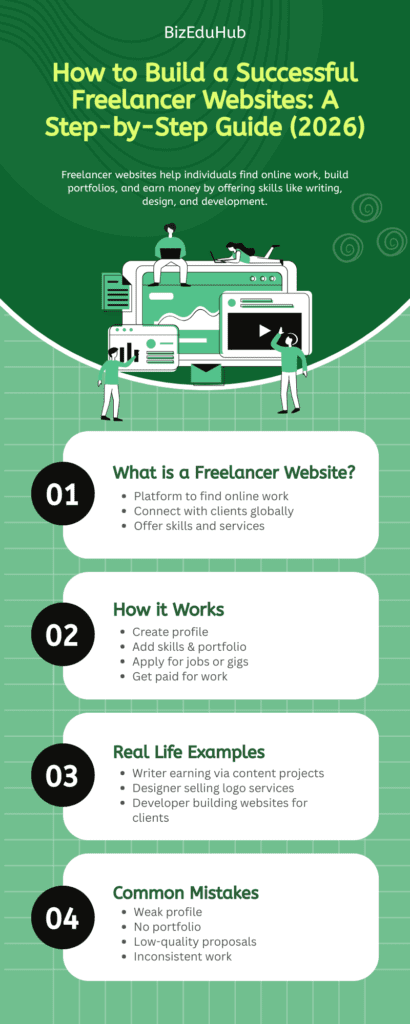
A freelancer websites is a professionally designed, self-owned online presence where you present your services, showcase your past work, share your story, and invite prospective clients to get in touch. It is distinct from a profile on platforms like Upwork or Fiverr — those marketplaces control the rules, the branding, and most importantly, the client relationship. Your freelance website belongs entirely to you.
Think of it this way: a marketplace profile is a stall at someone else’s market. Your own freelancing website is your own shop on your own street. You choose the layout, the lighting, the signage, and the prices. You build the relationship directly. And when the platform changes its algorithm — which they inevitably do — your business does not disappear overnight.
At its core, a well-built freelancer website typically includes a homepage that communicates your value proposition instantly, a services page outlining what you offer and to whom, a portfolio or work samples section, an about page that humanizes you, and a contact page with a clear call to action. Some freelancers also maintain a blog for SEO purposes or a testimonials section to build social proof. The combination of these elements, when executed thoughtfully, creates a powerful professional hub.
Why a Freelancer Websites Is Non-Negotiable in 2026
The freelance economy has matured considerably. Clients — whether they are startup founders, marketing directors, or small business owners — are more discerning than they were five years ago. Unreliable contractors, experienced miscommunication, and wasted budgets have burned them. Before they write their first email to you, they will Google your name. What they find in those first few seconds will determine whether they reach out or move on.
A thoughtfully built freelancing website signals several things simultaneously: that you take your work seriously, that you are established enough to invest in your own brand, and that you understand the importance of communication and presentation. These are qualities clients are paying for when they hire you — your website demonstrates them before the conversation even begins.
Beyond credibility, a freelancer websites is also one of the most powerful passive marketing tools available. With proper search engine optimization, your site can appear in front of potential clients who are actively searching for your services at 2 a.m. on a Tuesday — without you lifting a finger. That kind of reach is simply impossible through word-of-mouth or social media posting alone.
“Your website works while you sleep. It is the only member of your team that never takes a day off, never misses a deadline, and never asks for a raise.”
Key Elements of a High-Performing Freelancer Websites
1. Your Domain Name and Hosting Foundation
The journey begins before you touch a single design element. Your domain name — the address clients will type or click to find you — deserves careful thought. The cleanest option is usually your own name: yourname.com. It is personal, memorable, and ages well regardless of how your niche evolves. If your name is unavailable or difficult to spell, a variation like yournamedesigns.com or a niche-specific name like sharpfinancecopy.com can work well.
For hosting, reliability and speed are paramount. Slow-loading websites lose visitors — studies consistently show that users abandon pages that take more than three seconds to load. Providers like SiteGround, Kinsta, and Cloudways have strong reputations for performance. If you plan to use WordPress, look specifically for managed WordPress hosting; it handles technical maintenance and updates so you can focus on your actual work.
2. Platform Choice: WordPress, Squarespace, or Webflow?
This question trips up a remarkable number of freelancers. The honest answer is that the best platform is the one you will actually maintain. WordPress powers roughly 40% of the internet and offers unmatched flexibility, but it requires some technical comfort. Squarespace and Wix are beautifully designed, beginner-friendly, and surprisingly capable. Webflow sits in an interesting middle ground — it produces incredibly refined, fast-loading websites but has a steeper learning curve.
For most freelancer websites that are not web developers themselves, Squarespace or a WordPress site with a quality theme like Divi or Kadence is the sweet spot. The platform matters far less than the quality of your content, the clarity of your messaging, and the speed of your load times.
3. Design That Reflects Your Brand
Visual Identity
Your website’s visual design is not decoration — it is communication. A graphic designer’s website should feel different from a financial consultant’s. The colors, typography, whitespace, and imagery you choose all send signals about who you are and who your ideal client is. If you work with luxury brands, your website should feel refined and considered. If you specialize in bold, disruptive marketing for startups, it should feel energetic and contemporary.
Mobile Responsiveness
In 2026, over 60% of web traffic arrives via mobile devices. A freelancer websites that looks broken or cluttered on a smartphone is not a minor inconvenience — it is a business-critical failure. Every page, every button, every image must function beautifully on screens of all sizes. Test your site on at least three different devices before considering it ready to publish.
4. The Copy That Does the Selling
Many freelancers spend weeks agonizing over their website’s design and then write their copy in an afternoon. This is backwards. The words on your site will ultimately determine whether a visitor becomes a client. Your homepage headline should communicate exactly what you do and for whom, within about five seconds of reading. Avoid vague phrases like “passionate creative” or “results-driven professional” — these say nothing meaningful. Instead, try something specific: “I write email campaigns that turn subscribers into buyers — for sustainable ecommerce brands.”
Your about page deserves particular care. Clients hire people, not services. Share something real about why you do what you do, what your background looks like, and what it is actually like to work with you. You do not need to overshare, but a touch of genuine personality builds trust in a way that a list of credentials never can.
Step-by-Step: Building Your Freelancer Websites from Scratch

- Define your target client and niche. Before you write a single word or choose a color palette, know who you are trying to reach. The more specific you can be — “B2B SaaS companies with 10–50 employees” rather than “businesses” — the more powerfully your site will resonate with the right people.
- Register your domain name. Use Namecheap, Google Domains (now Squarespace Domains), or Cloudflare Registrar. Keep it short, easy to spell, and professional.
- Choose and set up your hosting and platform. Install WordPress or sign up for Squarespace/Webflow. Connect your domain name to your hosting provider through DNS settings — your host’s support documentation will walk you through this.
- Plan your site structure. Most freelancer websites need five core pages: Home, Services, Portfolio/Work, About, and Contact. Resist the urge to add more until you have those five performing well.
- Write your copy first, then design around it. Draft each page’s content in a Google Doc before touching your website builder. This prevents the common trap of designing a beautiful site with placeholder text that never gets replaced.
- Build and design each page. Use a clean, professional theme. Prioritize whitespace and readability. Choose a maximum of two fonts and three primary colors.
- Add your portfolio. Include three to eight of your strongest, most relevant work samples. If you are just starting, create sample projects or offer a reduced rate to one or two clients in exchange for permission to showcase the work.
- Optimize for search engines. Install an SEO plugin (Yoast or Rank Math for WordPress), write descriptive meta titles and descriptions for each page, and make sure your page headings use relevant keywords naturally.
- Set up Google Analytics and Search Console. You cannot improve what you do not measure. These free tools show you how visitors find your site and what they do once they arrive.
- Test everything. Click every link. Fill out your contact form. Load the site on your phone. Ask a friend with no technical background to navigate it and note where they get confused.
- Launch and announce. Share your new freelance websites on LinkedIn, in relevant communities, and with your existing network. Do not wait for it to be perfect — done is better than perfect, and you can always iterate.
Pro Tip: Set a recurring calendar reminder every 90 days to review and update your website. Stale content, outdated portfolio pieces, or old service descriptions can quietly cost you clients over time.
Real-Life Examples of Successful Freelancer Websites
Priya, Independent UX Designer: Priya had been freelancing for two years through referrals alone when she finally built a dedicated website. She chose a clean, minimal aesthetic — lots of whitespace, careful typography, case studies that walked clients through her design process step by step. Within six weeks of launching, she received two cold inquiries from companies that had found her through Google. One of those turned into a six-month contract. The website cost her a weekend to build and roughly $200 in annual hosting and domain costs. The return was immeasurable.
Marcus, Freelance Financial Copywriter: Marcus was skeptical that he needed a website when he already had a strong LinkedIn presence. He built one anyway, focused entirely on one niche: copywriting for fintech companies. His homepage headline read simply: “Clear, compliant copy for fintech brands that want to earn trust.” Within four months, his website was ranking on the first page of Google for several relevant search terms, and he had clients reaching out who had never interacted with him on social media at all.
Both Priya and Marcus succeeded not because they built the freelancer websites, but because they built focused ones. They knew who they were talking to, said something specific and compelling, and made it easy for the right clients to say yes.
Common Mistakes to Avoid When Building Your Freelancer Websites
Experience is a wonderful teacher, but it is also a slow and expensive one. Here are the most frequent missteps freelancers make when building their websites — so you can skip the tuition entirely.
- Trying to appeal to everyone. A website that speaks to all potential clients effectively speaks to none of them. The more specific your positioning, the more powerfully you resonate with the right people. Niching down feels risky until you experience the results.
- Burying the contact information. Make it effortless for a potential client to reach you. Your contact page should be one click away from anywhere on your site, and your email address or contact form should be visible without extensive scrolling.
- Using stock photos of strangers. Nothing undermines a personal brand faster than a website full of clearly generic stock photography. Use real photos of yourself, your actual workspace, or high-quality abstract imagery that fits your visual brand.
- Neglecting page load speed. Compress your images (tools like Squoosh or ShortPixel make this simple), minimize unnecessary plugins, and consider a content delivery network (CDN) if you serve clients across multiple regions. Speed is a ranking factor and a user experience factor simultaneously.
- Forgetting to include social proof. Testimonials from past clients are among the most persuasive elements on any freelancer websites. Even two or three strong quotes can dramatically increase conversion rates. Ask satisfied clients for testimonials proactively — most are happy to provide them if you simply ask.
- Launching once and abandoning the site. A freelancer websites is a living document, not a one-time project. Your services evolve, your portfolio grows, your niche sharpens. Build the habit of revisiting and updating your site regularly.
- Skipping the SEO basics. You do not need to become an SEO expert, but ignoring search optimization entirely means missing a significant source of inbound client interest. At minimum, write descriptive page titles, include relevant keywords in your headings and body copy, and make sure your site loads quickly.
Frequently Asked Questions About the Freelancer Websites
Q1. How long does it take to build a freelancer websites?
With focused effort, a complete and professional freelancer websites can be built over a single weekend. Realistically, most freelancers spend two to four weeks moving through the process — writing copy, selecting imagery, building pages, and testing. The temptation to keep refining indefinitely is real; resist it. A published site that is 85% perfect is infinitely more valuable than an unpublished site that is 100% perfect in your head.
Q2. Do I need to know how to code to build a freelancer websites?
Not at all. Platforms like Squarespace, Wix, and WordPress with a visual page builder (like Elementor or Divi) allow you to build a polished, professional freelancing website without writing a single line of code. Basic HTML and CSS knowledge is useful but absolutely not required to get started and succeed.
Q3. How much does a freelancer websites typically cost?
A self-built freelancer websites can cost as little as $150–$300 per year, covering a domain name, hosting, and any premium theme or plugin fees. If you hire a designer or developer to build it for you, costs typically range from $800 to $5,000 or more, depending on complexity. For most freelancers starting, a self-built site on Squarespace or WordPress is the pragmatic choice. Invest in professional design once your income supports it.
Q4. Should I include pricing on my freelancer websites?
This is a genuine strategic debate within the freelance community, and there is no universally correct answer. Publishing pricing filters out clients who cannot afford your rates before they contact you, saving you time and awkward conversations. On the other hand, withholding pricing encourages conversations where you can understand a client’s specific needs before quoting. As a starting point, consider listing starting prices or price ranges rather than exact figures — this provides transparency without locking you in.
Q5. How do I get my freelancer websites to appear on Google?
Start by submitting your site to Google Search Console and requesting indexing. Then focus on writing useful, specific content that matches what your ideal clients are searching for. Service pages with clear, keyword-rich descriptions and a blog that addresses common client questions are two of the most effective SEO strategies for freelancer websites. Results rarely appear overnight — typically expect three to six months before organic search traffic becomes meaningful — but the long-term payoff is significant.
Conclusion
Building a freelancer websites is one of the most empowering things you can do for your independent career. It is an act of claiming space, of saying: this is what I do, this is who I serve, and this is why I am the right choice. Done thoughtfully, your freelance website becomes a tireless advocate working on your behalf around the clock.
But let it also be said clearly: the website is a means, not an end. It is one piece of a larger strategy that includes the quality of your work, the depth of your client relationships, and the consistency with which you show up in your field. A beautiful website cannot compensate for weak skills, poor communication, or missed deadlines. What it can do — powerfully — is ensure that your genuine talent gets seen.
Start where you are. Build something real, honest, and specific. Publish it. Then go do excellent work, and let your freelancer websites quietly keep the door open for the next great opportunity to walk through.
!You might be interested in reading this page as well
Best Python Backend Developer Roadmap for Beginners (2026)