
Introduction to Game Development Languages
Some people discover their passion for programming through spreadsheets or data pipelines. Others find it through web apps or automation scripts. But for a surprisingly large number of developers, the spark came from a game — maybe one they played obsessively as a kid, or a late-night indie title that made them think, I want to build something like this. That feeling of a world responding to your input, characters doing exactly what you designed them to do, puzzles clicking into place — it’s unlike anything else in software.
If that’s your story, or even if you simply want to expand into one of the most creative corners of programming, understanding game development languages is your essential first step. Not all languages are built equal when it comes to game-making. Some excel at raw performance. Others prioritize beginner accessibility or engine compatibility. Some are so tightly woven into specific platforms that choosing a language means choosing an entire ecosystem.
In 2026, the landscape is richer — and more nuanced — than ever. This guide will walk you through everything you need to know to choose wisely, learn strategically, and start building games that actually feel alive.
What are Game Development Languages?
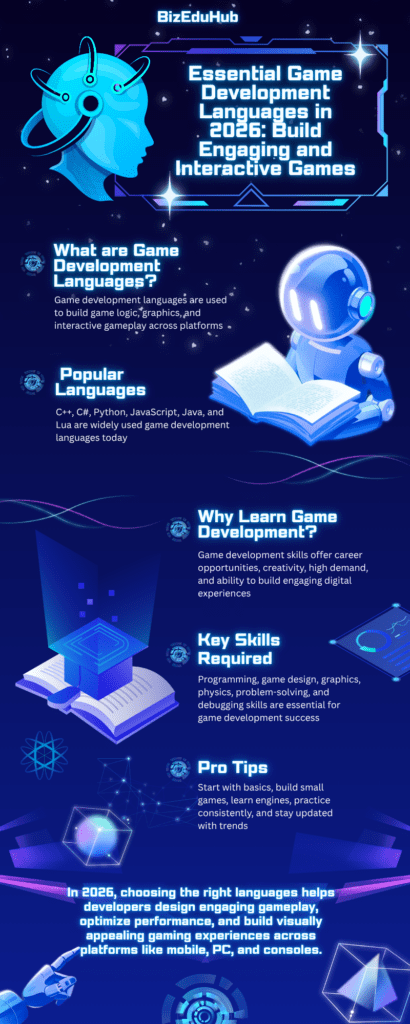
At their core, game development languages are programming languages used to write the logic, systems, and behaviors that make games function. They control how a character jumps, how an enemy tracks your position, how the physics engine responds to a collision, and how the game stores your progress when you quit for the night.
Unlike general-purpose programming, game development languages add a layer of real-time complexity that most other software domains don’t demand. A web server can take a few hundred milliseconds to respond. A game cannot. Everything — rendering, physics, input processing, audio playback — must happen within a fraction of a second to maintain a smooth experience. This places specific performance and design demands on the languages developers choose.
Not every programming language you could theoretically use is practical for game development. Python, for example, is beloved for scripting and prototyping, but its interpreted nature makes it too slow for performance-critical game loops without significant optimization. Conversely, Assembly language could technically produce ultra-optimized game code, but writing a modern 3D game in it would be a nightmarish undertaking.
The sweet spot — and where most professional and indie developers operate — lies in a handful of languages that balance expressiveness, performance, and tooling. Understanding why each exists in this space and what it’s best suited for is the foundation of becoming a capable game developer.
Why Game Development Languages Matter
Choosing the right language for your game isn’t a purely academic exercise. It shapes your workflow, your team dynamics, the tools available to you, the platforms you can target, and ultimately the kind of games you can realistically build.
Consider two developers: one chooses C++ to build a PC game from scratch, and the other chooses C# inside Unity to build a mobile puzzle game. Both are writing games, but they’re inhabiting completely different realities. The C++ developer has near-total control over memory and performance but must build or integrate a large number of systems manually. The Unity developer has a mature physics engine, a visual editor, a massive asset store, and a community of millions — but they work within the constraints of Unity’s architecture on game development languages.
In 2026, as gaming continues to expand across VR headsets, mobile devices, cloud streaming platforms, and traditional consoles, the stakes of that initial choice have only grown. Cross-platform development, multiplayer infrastructure, and real-time rendering demands all factor into which programming language will carry your project through to completion without buckling under the pressure.
There’s also a career dimension. Game studios — from indie collectives to AAA publishers — hire based on specific language proficiency. Knowing that Unreal Engine runs on C++, Unity on C#, and Godot on both GDScript and C# gives you a strategic advantage when aligning your learning with your job market ambitions. The language you invest months learning should align with the kind of game development languages you want to build and the companies or platforms you hope to work with.
Key Game Development Languages in 2026
1. C++ — The Foundation of AAA Game Development
If you look under the hood of virtually any major commercial game engine — Unreal Engine, CryEngine, id Tech — you’ll find C++. It has been the dominant language in high-performance game development for decades, and in 2026, that hasn’t changed.
Why C++ Still Leads
C++ gives developers direct control over memory management, something that matters enormously in game development languages where performance budgets are tight, and garbage collection pauses are unacceptable. When a AAA studio is squeezing every last frame out of a next-generation console, they cannot afford a language runtime deciding it’s time to clean up memory in the middle of a boss fight.
C++ is also deeply integrated into Unreal Engine — the engine behind titles like Fortnite, Gears of War, Hogwarts Legacy, and countless others. If your ambitions point toward working at a large studio or shipping a graphically intensive PC or console game, learning C++ is not optional; it’s the price of entry.
That said, C++ is genuinely difficult. Its syntax is complex, its error messages are famously cryptic, and the concept of manual memory management is alien to developers coming from higher-level languages. But those who push through the learning curve often describe a feeling of deep empowerment — a sense that they truly understand what the computer is doing.
2. C# — The Gateway to Unity and Accessible Game Development
For most indie developers and beginners, C# in the Unity engine is the most practical starting point in game development languages today. Unity powers a staggering proportion of the world’s mobile games, as well as a significant share of indie PC and console titles.
C# Inside Unity
C# is a modern, object-oriented language developed by Microsoft. It’s cleaner and more forgiving than C++, with automatic memory management, strong typing, and excellent IDE support. Inside Unity, C# scripts attach to game objects and define their behavior — how they move, respond to collisions, trigger animations, or interact with other systems.
The Unity + C# combination is powerful because the engine handles so much of the hard work: rendering pipelines, physics simulation, audio management, input handling, and cross-platform builds. A developer with solid C# skills and Unity knowledge can genuinely ship a complete game to iOS, Android, PC, and console from a single codebase. For a solo developer or small team, that’s remarkable leverage.
C# is also genuinely useful outside of Unity — it’s Microsoft’s primary language for .NET development — so time invested in C# compounds across multiple career paths.
3. GDScript and C# in Godot — The Open-Source Contender
Godot has emerged as one of the most exciting game engines of the decade, and its primary scripting language, GDScript, was purpose-built for game development. GDScript is Python-like in its readability and syntax, making it accessible to beginners while remaining expressive enough for serious projects.
Why Godot’s Language Ecosystem Matters
What makes Godot particularly relevant in 2026 is its trajectory. Following Unity’s controversial changes to its pricing model in 2023, a significant portion of the indie development community migrated to Godot — and they’ve stayed. The engine is open-source, free in the fullest sense of the word, and improving rapidly.
For developers who find C# too heavy and want a language designed specifically for game scripting rather than general-purpose programming, GDScript is a genuinely compelling option. Its scene-and-node architecture maps naturally to how games are structured, and the feedback loop between writing code and seeing results in the editor is among the fastest in any game engine.
Godot also supports C# as a first-class language for developers who want more performance or are transitioning from Unity. This dual-language approach gives teams flexibility that few other engines match.
3. Lua — The Embedded Scripting Language
Lua occupies a fascinating niche in game development languages. It’s rarely used to build an entire game from scratch, but it’s embedded in countless game engines and titles as a lightweight scripting layer. World of Warcraft‘s addon system runs on Lua. Roblox, one of the most popular gaming platforms among younger audiences, uses a Lua variant called Luau. The LÖVE framework lets developers build 2D games entirely in Lua.
Lua’s Unique Strengths
Lua is tiny, fast, and designed to be embedded. Game engines that need to expose behavior customization to modders or level designers often choose Lua because it can be dropped into a C++ codebase with minimal overhead. For game developers interested in modding ecosystems, tools development, or platforms like Roblox, Lua is worth knowing.
4. JavaScript — Games in the Browser and Beyond
It would be incomplete to discuss programming languages for game development without addressing JavaScript. While it’s not the first choice for high-performance 3D games, JavaScript has a legitimate place in game development languages — particularly for browser-based games, educational games, and casual mobile titles.
Frameworks like Phaser have made browser-based 2D game development in JavaScript genuinely capable. More recently, the rise of WebGPU and improvements in browser runtime performance have expanded what’s possible in the browser. For developers who already have a JavaScript background and want to build web-first games or casual mobile experiences, the barrier to entry is remarkably low.
5. Rust — The High-Performance Newcomer
Rust is gaining ground in game development circles as an alternative to C++ for performance-critical systems. Its ownership model eliminates entire categories of memory bugs — a significant advantage when game codebases grow complex. Engines like Bevy are built entirely in Rust and have attracted a passionate community.
Rust is not yet a mainstream game development languages in the way C++ or C# are, but its influence is growing. Developers building game engines, performance-critical tools, or custom backend systems for multiplayer games increasingly consider Rust a serious option.
Practical Tips for Choosing and Learning Game Development Languages

- Start with one engine before one language. Choose Unity (C#) or Godot (GDScript) as your entry point. Let the engine guide your language choice, not the other way around.
- Build tiny, complete games first. A finished Pong clone teaches you more than an abandoned RPG prototype with complex systems. Completion builds skills; abandonment builds discouragement.
- Read other people’s code. GitHub is full of open-source game projects. Reading code written by experienced developers accelerates your understanding faster than tutorials alone.
- Learn the math. Vector mathematics, linear algebra, and trigonometry appear constantly in game development languages. You don’t need a degree — just enough to understand how position, velocity, rotation, and collision detection work.
- Version control from day one. Use Git for every project, no matter how small. Game development languages produce large assets and complex codebases. Learning version control early saves enormous pain later.
- Understand the engine before fighting it. Every engine has opinionated patterns. Learn Unity’s MonoBehaviour lifecycle or Godot’s scene system on their own terms before trying to bend them to patterns from other paradigms.
- Build with others when you can. Game jams — weekend events where developers build games around a theme — are the fastest way to grow. The social pressure of a deadline and the exposure to other developers’ approaches compresses months of solo learning into days.
Real-Life Examples: Game Development Languages in Action
Consider the journey of an indie developer who set out to build a top-down dungeon crawler. They started in Unity using C#, building a character controller, implementing tile-based maps, and wiring up a basic combat system. Six months in, they had a playable prototype that eventually shipped on Steam. The C# + Unity combination allowed them to focus on design decisions rather than engine implementation, and the asset store provided a particle system and audio tools that would have taken weeks to build from scratch.
Now consider a small studio that built a multiplayer battle royale with Unreal Engine. The core gameplay systems — character movement, weapon physics, network replication — were written in C++. But the team used Unreal’s Blueprints visual scripting system alongside C++ for gameplay logic that designers needed to tweak frequently. This hybrid approach is extremely common in professional Unreal development: C++ for the heavy lifting, Blueprints for the collaborative layer between programmers and non-programmers.
A third example: a solo developer building a puzzle game for mobile chose Godot and GDScript. The lightweight engine produced a small binary ideal for mobile distribution, GDScript’s simplicity let them iterate quickly, and Godot’s free license meant zero royalty concerns if the game sold well. In 2026, this is an increasingly viable and financially smart path for small-scale game development languages.
Common Mistakes to Avoid in Game Development Languages
- Switching languages too often. The grass always looks greener in a different language. Developers who spend three months in C#, switch to GDScript, then pivot to Rust,t never go deep enough in any one language to build something meaningful. Commit to a choice for at least one complete project before evaluating whether to change.
- Mistaking language knowledge for game development knowledge. Knowing C++ syntax doesn’t make you a game developer. Game development also requires understanding game loops, state machines, physics concepts, input systems, and rendering pipelines. Language is a tool; game knowledge is the craft.
- Over-engineering early projects. It’s tempting to design a beautiful architecture before writing a single line of gameplay code. Resist it. The architecture that seems elegant in theory often doesn’t survive contact with actual game requirements. Write the messy version first, then refactor when you understand the problem.
- Ignoring performance until it’s too late. Game development languages have real-time constraints. Discovering in the final stages of development that your update loop is too slow to maintain 60 frames per second is a crisis. Profile early, understand where your bottlenecks are, and make informed optimizations.
- Underestimating scope. Every game developer has made this mistake at least once. The project that started as “a quick platformer” balloons into a vast world with crafting systems and NPC dialogue trees. Learn to define a minimal viable version of your game idea and build that first, completely.
Frequently Asked Questions About Game Development Languages
Q1. Which game development languages should an absolute beginner learn first?
For most beginners, C# with Unity or GDScript with Godot are the two best starting points. Both languages have gentle learning curves relative to C++, both have extensive documentation and community support, and both are used in real shipped games. If you’re drawn to web-based games or already know JavaScript, starting with Phaser is also a reasonable path.
Q2. Is C++ necessary for game development languages?
Not for all game development, but yes for certain career paths. If you want to work at a major studio on AAA titles — especially those using Unreal Engine — C++ proficiency is essentially required. For indie development, mobile games, or small to mid-scale PC titles, C# or GDScript will take you very far. Learn C++ when the projects you want to build or the jobs you want to land demand it.
Q3. Can Python be used for game development languages?
Python can be used for game development through libraries like Pygame, but it’s not well-suited for performance-intensive games. It works adequately for simple 2D games, game jam projects, and prototyping. For anything more demanding, you’ll hit performance walls. That said, Python is excellent for game tooling, procedural content generation scripts, and backend game server work.
Q4. How long does it take to learn a game development languages well enough to build a real game?
With consistent practice — an hour or two daily — most people can build a simple but complete game development languages within three to six months of starting from zero. “Well enough to build a real game” is more about persistence and project completion than language mastery. You don’t need to know everything about C# to finish a puzzle game; you need to know enough to implement the specific systems your game requires, then learn the rest as you go.
Q5. What game development languages does Roblox use?
Roblox uses Luau, a typed variant of Lua developed internally by Roblox. It’s designed for safety and performance within the Roblox platform. For developers specifically interested in building on Roblox — which has an enormous player base, particularly among younger audiences — learning Luau is the natural path.
Conclusion
There’s no single answer to which game development languages you should learn, and anyone who tells you otherwise is oversimplifying a rich and genuinely complex landscape. The honest answer is: it depends on the games you want to build, the platforms you want to target, and the career you want to grow into.
What is clear is that the world of programming languages for game development in 2026 offers extraordinary options at every level. A beginner can pick up GDScript and ship a polished indie title. An experienced C++ developer can push Unreal Engine to its creative limits. A web developer can bring their JavaScript skills to browser gaming and build something genuinely delightful. The ecosystem has never been more welcoming, more diverse, or more capable.
Whatever game development languages you choose, the most important thing is to start — and to finish something. One complete game, however small, will teach you more about game development than a hundred abandoned prototypes. It will also give you something no tutorial can: the quiet pride of watching someone else play something you built, and seeing them smile.
That feeling is worth every cryptic error message, every physics bug, every late night spent debugging collision detection. It’s why game developers do what they do. And it’s waiting for you on the other side of your first shipped project.
!You might be interested in reading this page as well
Front-End Development Best Practices in 2026: Build Fast and User-Friendly Websites