
Introduction to AI Design Tools for UI/UX
I still remember the first time a user test humbled me completely. I had spent two weeks on a mobile onboarding flow — every screen considered, every transition deliberate, every word chosen carefully. The tester opened the app, paused for three seconds on the first screen, then looked up and said: “What am I supposed to do here?”
That gap between what designers intend and what users actually experience is the central challenge of UI/UX work. It’s the reason the discipline exists in the first place. And it’s the reason that any tool capable of closing that gap — of helping designers move faster from concept to tested, functional, user-informed design — deserves serious attention.
In 2026, AI design tools for UI/UX have become some of the most practically valuable capabilities available to the field. Not because they’ve solved the hard problems of human-centered design — those remain stubbornly, beautifully human — but because they’ve dramatically reduced the distance between a designer’s intention and a working, testable, refinable experience. This guide covers what they are, why they matter, and how to use them without losing the creative judgment that makes good UX actually good.
What are AI Design Tools for UI/UX?
AI design tools for UI/UX refer to a category of software that uses machine learning to assist designers, specifically in building user interfaces and crafting user experiences. The scope of what this covers has expanded considerably — and in 2026, it spans the full design process from early research and wireframing through visual design, prototyping, testing, and handoff.
At the research end, intelligent tools can analyze user behavior patterns, synthesize qualitative feedback from large interview sets, identify friction points in existing flows, and surface insights that would take a researcher days to compile manually. This isn’t replacing the researcher’s judgment — it’s handling the aggregation and pattern recognition so the researcher can spend time on interpretation and strategy.
In the AI design tools for UI/UX phase, these tools assist with layout generation, component suggestions, spacing systems, and responsive behavior — often working within an established design system to ensure that new work stays consistent with existing patterns. More sophisticated platforms can even propose interface alternatives based on documented usability best practices, flagging layouts that might create confusion before they ever reach a user.
Prototyping is perhaps where the change has been most visible. Generating interactive, realistic prototypes from static designs — complete with transitions, micro-interactions, and conditional logic — has gone from a multi-day technical task to something achievable in a working session. And at the handoff stage, tools that automatically generate developer-ready specifications, detect inconsistencies, and document component behavior have significantly reduced the friction that used to live between design and engineering.
Why AI Design Tools for UI/UX Are Important in 2026
1. The Complexity Problem Has Gotten Harder
Modern digital products are more complex than they’ve ever been. A typical consumer app in 2026 operates across multiple device types, adapts to user preferences and accessibility needs, handles dozens of distinct user states, and must maintain visual consistency across hundreds of individual screens and components. Managing that complexity with entirely manual design processes is not just slow — it’s error-prone in ways that affect real users in the AI Design Tools for UI/UX.
Intelligent design assistance doesn’t eliminate complexity. But it does make complexity more manageable. When a design system update can propagate across all instances automatically, when accessibility checks happen in real time rather than as a final audit, when responsive behavior is generated rather than manually specified, the cognitive load on the designer drops enough that the important decisions can get the attention they deserve.
2. The Speed Expectation Has Shifted
The product development cycle has compressed. Teams that used to operate on six-week design sprints are now expected to move in two. The research, synthesis, concepting, prototyping, and testing work hasn’t decreased — there’s just less time to do it. For UX designers, this has created pressure that, without assistance, tends to manifest in one of two unhelpful ways: either cutting the research and testing phases that produce the most valuable insights, or working unsustainable hours.
The best AI design tools for UI/UX create a third option: doing more of the work in the same time, without sacrificing the thinking that makes the work meaningful. When synthesis takes hours instead of days and prototypes are built in an afternoon instead of a week, the timeline pressure eases enough to protect the work that actually requires unhurried human attention.
3. Better Decisions Earlier Save Real Money
Every AI design tools for UI/UX decisions that gets caught and corrected before development costs a fraction of what the same decision costs after. This is not new wisdom — it’s been the core economic argument for investing in UX for decades. What has changed is the speed at which intelligent tools can surface potential issues: accessibility violations, usability patterns associated with high drop-off rates, inconsistencies with platform guidelines, and component states that haven’t been accounted for. Catching these in the design phase rather than the QA or post-launch phase represents significant real-world cost savings.
Key Aspects of Intelligent AI Design Tools for UI/UX
1. Wireframing and Early Concept Development
From Description to Structure
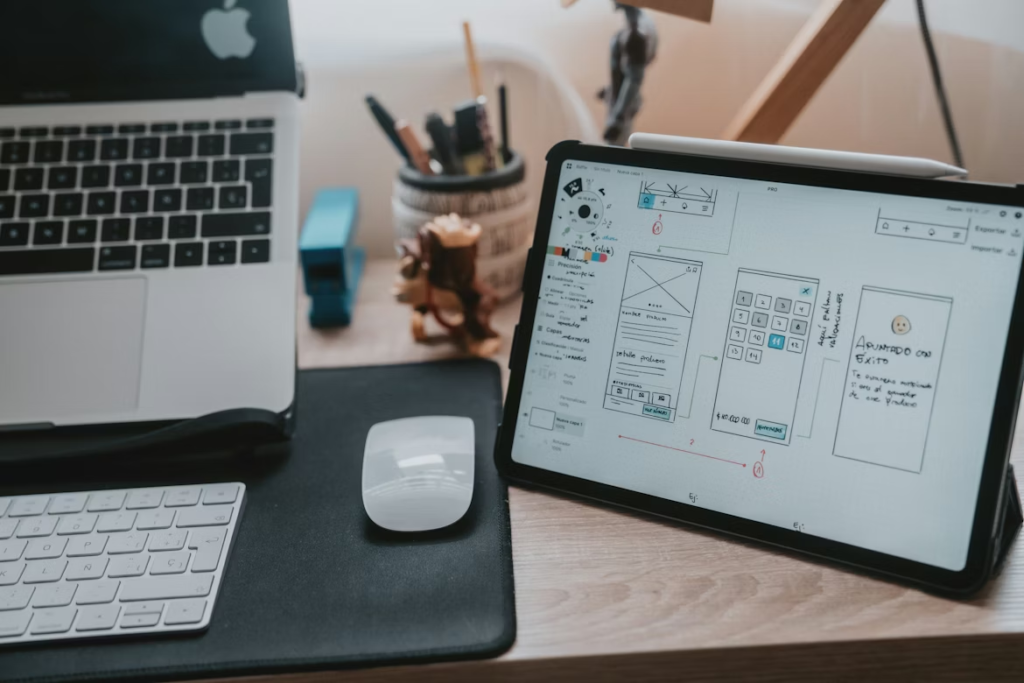
One of the historically difficult things about the early stages of UX design is communicating structural ideas before they’re fully visual. Low-fidelity wireframes are the traditional answer — quick sketches that establish hierarchy and flow without committing to visual design. But even wireframing takes time, and in the early stages of a project, speed of exploration matters enormously.
Modern intelligent design tools have meaningfully accelerated this phase. The ability to describe a screen’s purpose and key content needs — and receive a credible structural layout as a starting point — changes the economics of early-stage exploration. Instead of wireframing three layout options manually, a designer can generate eight structural variations in the time it previously took to build two, evaluate them with fresh judgment, and take the most promising direction forward for refinement through AI design tools for UI/UX.
User Flow Mapping and Logic
Beyond individual screens, intelligent tools in 2026 assist with mapping the connective tissue between screens — the user flows that determine whether an experience feels intuitive or confusing. Tools that can visualize flow logic, identify missing states (what happens when the data fails to load? What does the empty state look like?), and flag potential dead ends before prototyping begins have prevented countless hours of rework for UX designers who’ve adopted them.
2. Component Design and Design Systems
Consistency That Scales
Design systems are the backbone of good product design at scale. A well-maintained system means that every designer on a team is working with the same foundational elements, that every screen feels like it belongs to the same product, and that updates can propagate coherently rather than requiring a manual find-and-replace operation across hundreds of files.
Maintaining that consistency under the pressure of fast-moving development cycles has historically been genuinely difficult. Intelligent AI design tools for UI/UX that understand and work within an established system — flagging deviations, suggesting compliant alternatives, and documenting component behavior automatically — have made design systems significantly more practical to maintain and significantly more likely to be used correctly.
Responsive and Adaptive Design
Specifying how a design should behave across screen sizes and device types used to be one of the most time-consuming parts of the handoff process. Each breakpoint needed to be individually considered and documented. Intelligent tools that understand responsive logic — that can look at a desktop layout and propose credible tablet and mobile adaptations with an understanding of how content hierarchies shift across sizes — have returned substantial time to the parts of the process that most need it.
3. Prototyping and Interaction Design
From Static to Interactive — Faster
The jump from a static mockup to an interactive prototype has always been where projects slow down. Not because the thinking is hard — the designer usually knows exactly how the interaction should feel — but because expressing that knowledge in a tool capable of communicating it to stakeholders and developers was historically a technical task with a steep learning curve.
In 2026, the AI design tools for UI/UX bridging this gap have matured significantly. Interaction patterns, micro-animations, transition logic, and conditional behavior can be defined and previewed with far less technical overhead than was required even three years ago. The result is that more designers are prototyping more aspects of their work, more often, which means more user-facing details get thought through and tested before development begins.
4. Usability Testing and Research Synthesis
Understanding Users Faster
Qualitative research — the interviews, usability tests, and observational studies that produce a deep understanding of user needs and behaviors — has always been time-intensive not just to conduct but to analyze. Synthesizing twenty interview transcripts into coherent themes and actionable insights can take a researcher several days of careful, concentrated work in the AI design tools for UI/UX.
Intelligent synthesis tools have compressed this significantly. Not by replacing the researcher’s interpretive judgment, but by handling the first layer of pattern recognition: identifying repeated phrases, clustering related observations, surfacing themes across large data sets. The researcher still does the work of making sense of what the patterns mean — which is where the actual value lies — but starts that work with a far more organized foundation.
Practical Tips for Getting the Most From AI Design Tools for UI/UX
- Define your starting material carefully. The quality of what intelligent tools produce is determined by the quality of what you put in. Before generating layouts or components, be specific: what is this screen for? What must the user be able to do? What emotional register should it communicate? Clear input consistently produces more useful output.
- Use generation for exploration, not execution. Generated layouts, components, and flows are thinking prompts, not shipping-ready solutions. The value is in what they reveal about what you actually want — use them to clarify your own direction, not to shortcut the design process.
- Integrate accessibility checks from the start. AI Design Tools for UI/UX that surface accessibility issues in real time are most valuable when they’re part of the active design process, not a final audit. Make it a habit to address flagged issues as they arise rather than deferring them to a review stage where they’re more disruptive to fix.
- Prototype earlier and more often. The reduced friction in modern prototyping tools means there’s no longer a good reason to delay interactive prototyping until late in the process. Earlier prototypes produce earlier feedback, and earlier feedback prevents late-stage rework.
- Document your system as you build it. The AI design tools for UI/UX that get the most from intelligent design systems are the ones whose systems are well-documented. The more clearly your design system defines rules, component behavior, and usage guidelines, the more useful the intelligent tooling built around it becomes.
- Pair tool efficiency with deliberate user research. The risk of working faster is working faster away from users rather than toward them. Use the time recovered from production tasks to do more research and testing, not less.
Real-Life Examples: AI Design Tools for UI/UX in Practice
The Startup Product Team
A three-person product design team at an early-stage fintech startup was building its core banking dashboard under significant deadline pressure. The full feature set needed to be designed, prototyped, and handed off to development within six weeks — a timeline that, with traditional methods, would have required either dramatic scope reduction or significant overtime.
By integrating intelligent layout and prototyping tools into their process, the team was able to maintain full scope. The wireframing phase that would normally have taken two weeks was completed in five days. Component generation within their developing design system reduced repetitive production work substantially. And prototyping — which would typically have started in week four — was possible by week two, giving them two additional rounds of user testing before handoff by the AI design tools for UI/UX.
The Enterprise UX Redesign
A large retail company undertaking a complete redesign of its e-commerce checkout flow had a specific problem: its team was distributed across three time zones, and maintaining design consistency across that team had historically required exhausting amounts of coordination and review.
Implementing an intelligent design system that flagged inconsistencies in real time and suggested system-compliant alternatives changed the coordination dynamic significantly. AI Design Tools for UI/UX in each time zone could work with confidence that their contributions would align with the overall system, and the design review process shifted from catching errors to evaluating decisions — a much more productive use of the team’s collective attention.
Common Mistakes to Avoid in AI Design Tools for UI/UX
- Treating Generated Designs as Final: The single most common mistake. Intelligent tools produce capable starting points. They do not produce finished products. Every generated layout, component, or flow needs to pass through the filter of a designer’s judgment, a user’s experience, and your specific product’s context before it can be considered ready for the AI design tools for UI/UX.
- Designing Without User Research: Speed creates the temptation to skip the research phase and rely on “what we know” about users. This is always a risk, but it’s a more acute one when you can produce polished-looking interfaces quickly. A beautiful design built on wrong assumptions about user needs is still a bad design. Protect your research process fiercely, especially when timelines are tight.
- Letting Tools Define the Design Language: Every widely used design tool has aesthetic defaults — the typefaces it reaches for first, the spacing it considers “balanced,” the color relationships it gravitates toward. Work that doesn’t push beyond those defaults tends to look like everyone else using the same tools.
- Over-Automating Handoff: Automatically generated developer specifications are a significant efficiency gain — when they’re accurate and well-organized. But automated handoff can create false confidence. Component behavior, edge cases, interaction nuances, and design intent don’t always transfer perfectly through automated documentation.
- Ignoring Emotional Design in Favor of Efficiency: Good AI design tools for UI/UX are not just about usability. It’s about how an experience makes someone feel. Intelligent tools optimize well for functional correctness — they can flag usability issues, enforce consistency, and suggest structurally sound layouts. They don’t have feelings. The warmth, the delight, the sense of an experience that respects and understands you.
Frequently Asked Questions About AI Design Tools for UI/UX
Q1. Can AI design tools for UI/UX replace UX researchers?
No, and the framing of that question reflects a common misunderstanding of where these tools add value. Intelligent research tools assist with the aggregation and pattern recognition phases of qualitative analysis — tasks that are time-intensive but don’t require the depth of judgment that makes research valuable. The interpretive work — making sense of what patterns mean, understanding the why behind user behavior, identifying opportunities that data alone can’t surface — remains entirely human through AI design tools for UI/UX.
Q2. How do intelligent design tools handle accessibility requirements?
This varies by platform, but the better tools in 2026 include real-time accessibility checking as a standard feature: contrast ratio verification, text size minimums, touch target sizing, screen reader compatibility flagging, and keyboard navigation logic. The most sophisticated platforms integrate WCAG guidelines directly into the design process, surfacing issues as they’re created rather than requiring a separate audit. This doesn’t guarantee accessible products — designer judgment and user testing with people who use assistive technology remain essential.
Q3. Are these tools suitable for complex enterprise product design?
Yes, with the caveat that the complexity of enterprise product design puts a premium on design system coherence and cross-team consistency — areas where intelligent tooling tends to provide the most value. Enterprise teams are often the ones who see the largest productivity gains from system-aware AI design tools for UI/UX, because the coordination costs they replace are the highest. The key is ensuring the design system is well-defined and maintained, as the quality of intelligent assistance is proportional to the quality of the system it’s working within.
Q4. How do I maintain my own creative voice when using these AI design tools for UI/UX?
This is the right question to be asking. The answer is to establish your creative direction before turning to intelligent assistance. Know what you’re trying to achieve aesthetically and experientially before you generate anything. Use generated outputs to explore and react — to clarify what you want through the process of rejecting what you don’t — rather than to define your direction. Designers with a strong point of view consistently produce more distinctive work with these tools than designers who use the tools to figure out what they think.
Q5. What’s the learning curve like for these platforms?
Most modern AI design tools for UI/UX are built for accessibility rather than technical depth — the barrier to getting useful outputs is lower than it’s ever been. The real learning curve is developing the skill of directing these tools effectively: understanding how to specify what you want with enough precision to get genuinely useful results, building the habit of critical evaluation rather than acceptance, and integrating new capabilities into an existing workflow without disruption. Most designers find that focused practice over two to four weeks is enough to develop genuine fluency with a new platform.
Conclusion
The best AI design tools for UI/UX work I’ve ever seen shared a quality that tools can’t manufacture: the sense that the person who made it genuinely understood and cared about the people who would use it. That quality comes from curiosity, from listening, from the willingness to be humbled by a user test and start again. No software can replicate it.
The best AI design tools for UI/UX can do is protect the time and energy required to bring that quality to your work consistently. When the production work takes less time, the research and thinking can take more. When prototypes are faster to build, they get tested more. When inconsistencies are caught automatically, design reviews focus on what actually matters.
That’s the honest case for integrating intelligent design capabilities into a UI/UX practice: not that they make the work easier, but that they make the hard work more possible. The parts of UX design that require genuine human attention — understanding people, making empathetic decisions, crafting experiences that feel respectful and intuitive — those are what the recovered time is for.
!You might be interested in reading this page as well
Top AI Design Tools in 2026: Transform Your Creative Workflow